Skip to content

Service

Pharmacy POS and inventory software

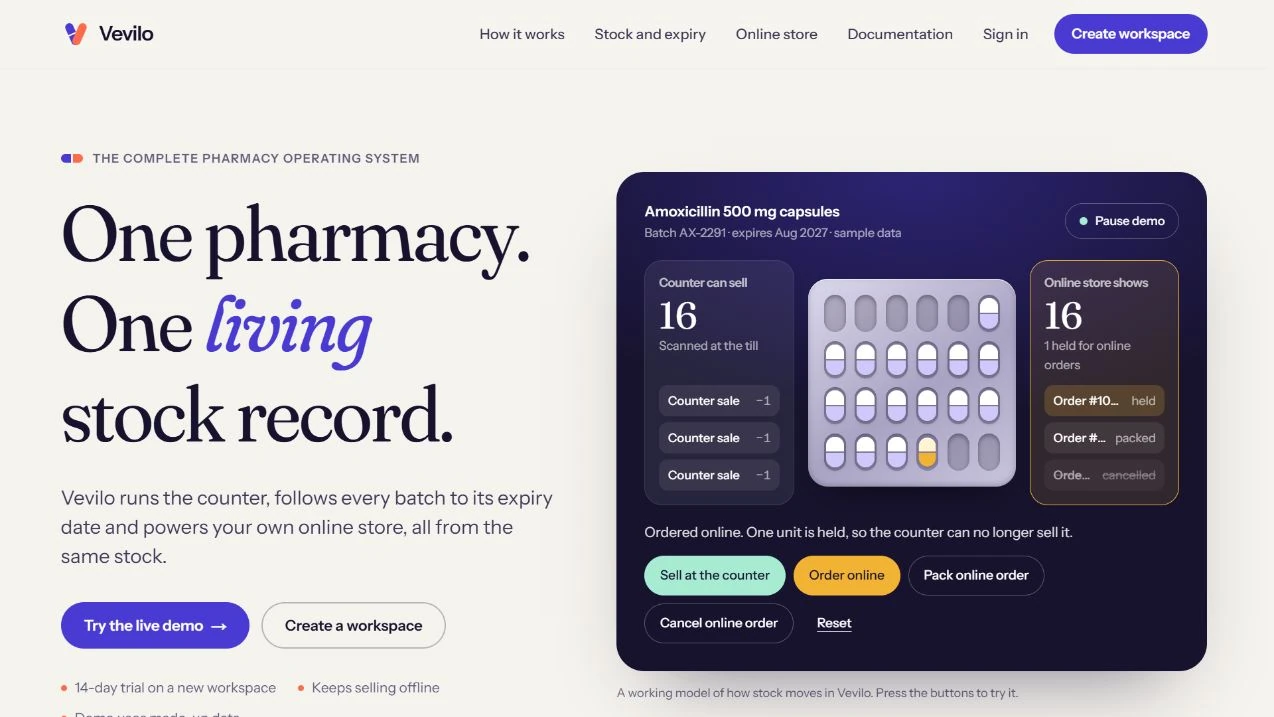
AI Techbom builds pharmacy POS and inventory software for counters that need to keep working through internet outages. Vevilo shows how a desktop till, batch and expiry tracking, and an online store can share an inventory record while the till holds stock it can safely sell offline.

vevilo / shared inventory
Vevilo’s public product preview shows the pharmacy counter and online store reading from the same stock record.

Who it is for

Built for teams like these.

  • Independent pharmacies replacing a till

    Plan the move from the current sales and stock process, including barcode lookup, imported products and training with the counter team.

  • Pharmacies adding online ordering

    Use shared availability rules so stock promised online stays visible to the rest of the business.

  • Teams reconciling several counters

    Define which stock is allocated to which till, how reconnects are reconciled and who can adjust a batch or cancel a sale.

The problems it solves

What goes wrong without it.

  1. 01

    Checkout stops when internet drops

    A till needs the catalogue, prices and sellable allocations it can operate on offline. Define what becomes available again only after a reconnect.

  2. 02

    Two packs share a SKU and expire on different days

    Stock movements need the batch as well as the SKU so receiving, checkout and adjustment can distinguish the packs.

  3. 03

    A stock count looks right but cannot be promised

    Total units may include online reservations and stock already allocated to another counter. Use distinct states for those quantities.

What we build

What is covered.

  • Offline point of sale

    Plan which counter actions continue offline, how receipts are recorded and what staff see when the local allocation for a product runs out.

  • Batch, expiry and stock movements

    Scope receiving by batch, near-expiry views, adjustments and reconciliation of each batch after a sale or return.

  • Stock catalogue migration

    Map current products, barcodes, batches and opening counts. Validate records using a sample import and a stock count before the switch.

  • Online stock reservations

    Reserve stock at the point you promise it to the customer. Define how expiry, cancellation and reconnects release or reconcile the reservation.

How we work on it

The approach, for this kind of project.

The full seven-stage process
  1. 01

    Walk the counter workflow

    Follow stock receiving, a sale and a return with staff. Record the hardware currently in use and the actions that must survive an outage.

  2. 02

    Rehearse the stock import

    Import a sample, compare counts by batch and check duplicate barcodes, missing expiry dates and opening balances.

  3. 03

    Test a disconnected sale

    Disconnect a till while an online order reserves stock. Reconnect, retry a sync and compare the counter record with the shared stock ledger.

  4. 04

    Pilot before changing every till

    Verify staff can reconcile the closing count, see an expired batch and find a past sale before expanding the rollout.

In our work

Vevilo, built around the pharmacy counter.

See Vevilo's counter and inventory screens and how the till keeps selling from its allocation while offline. AI Techbom also built and supports an earlier offline POS for Urmar Pharmacy.

  • Vevilo’s public product preview shows the pharmacy counter and online store reading from the same stock record.

    AI Techbom product / pharmacy operations and pos

    Vevilo

    Vevilo runs the pharmacy counter, tracks medicine batches and expiry dates, and powers a branded online store from one stock record. The desktop till can keep selling through an internet outage.

    Live product

Every project is labelled with where it really stands. All work

Realistic examples

Situations we would scope.

These are typical starting points, not past clients. Tell us yours and we will say honestly whether it fits.

  • A busy counter with unreliable connectivity

    Take ordinary sales from an allocated stock pool and sync them later while staff can see which products have run out locally.

  • A pharmacy opening an online storefront

    Plan when an online basket becomes a reservation and when cancelled orders put stock back into availability.

  • An inventory migration with old batches

    Audit duplicate SKUs and missing expiry dates, then run a staged import whose batch totals can be compared with a physical count.

Questions

Straight answers.

Something else? Ask us.

Does the pharmacy POS work without internet?

Vevilo can sell from locally allocated stock during an outage and reconcile those sales when reconnected. The scope for another deployment should specify which till actions must work offline.

Can the POS track batches and expiry dates?

Yes. Vevilo tracks medicine batches and expiry dates. A project can define how staff receive stock, choose a batch and investigate near-expiry stock or adjustments.

Can we use our current scanners and printers?

Share the models and operating system. Hardware and driver compatibility should be checked on the actual workstation before rollout.

How is a pharmacy POS project priced?

The number of locations and tills, hardware, data quality, integrations and local reporting requirements affect scope. Share a sample stock export to help estimate migration separately.

Show us how your counter and stock work.

Tell us how many tills and branches you have, which tasks must work offline, and what you can export from your current system.

Discuss a pharmacy POS